
Did you know that Excel is now an esport? It sounds like a joke, but the Excel World Championship (by the FMWC) has exploded in popularity. Millions of people are watching pros solve complex financial models in record time on ESPN and YouTube.
You might be wondering: “How do they do it so fast?” or “Could I ever be that good?”
The truth is, these “Excel Athletes” aren’t using magic. They are using a specific set of tools and keyboard shortcuts that anyone can learn.
In this article, we break down the 5 secrets used by the world’s best modelers that you can apply to your daily job to save hours of work.
1. Never Touch the Mouse (The Golden Rule)
Watch any clip of the Championship. You will notice one thing: their hands never leave the keyboard. Touching the mouse is too slow.
The Secret: The ALT Key. Press the Alt key in Excel right now. You will see small letters appear over the menu ribbon.
- Want to go to the Data tab? Press
A. - Want to Remove Duplicates? Press
M.

Try this Combo: Select a table and press Alt + N + V + T. You just created a Pivot Table in 1 second.
2. They Don’t Use VLOOKUP (They Use XLOOKUP)
In a competition where every second counts, VLOOKUP is too risky. It breaks if you insert columns and it’s slow to calculate.
The pros use XLOOKUP (or Index/Match) because it is bulletproof. It handles errors automatically and searches in any direction.
👉 Learn the difference: XLOOKUP vs. VLOOKUP: Why It Is Time to Switch.
3. Dynamic Arrays (The “Spill” Magic)
Old school Excel required dragging formulas down thousands of rows. The champions use Dynamic Arrays.
Functions like SEQUENCE, SORT, and UNIQUE allow one single formula to fill (“spill”) into hundreds of cells automatically.
- Example: Instead of sorting a table manually, they type
=SORT(A2:B100)and the data is instantly reordered in a new list.
4. They Visualize Data Instantly
In the “Case Studies” of the championship, solving the math is only half the battle. You often need to spot the outlier or the trend immediately.
They use Conditional Formatting to turn numbers into heat maps instantly.
- Scenario: Find the highest cost in a list of 5,000 items.
- Pro Move:
Alt + H + L + S(Color Scales). The highest number turns green, the lowest turns red. Done.
👉 Master this skill: How to Use Conditional Formatting in Excel.
5. Fast Data Cleaning
The datasets in the World Championship are often “messy” on purpose. Names are mixed with IDs, or dates are formatted as text.
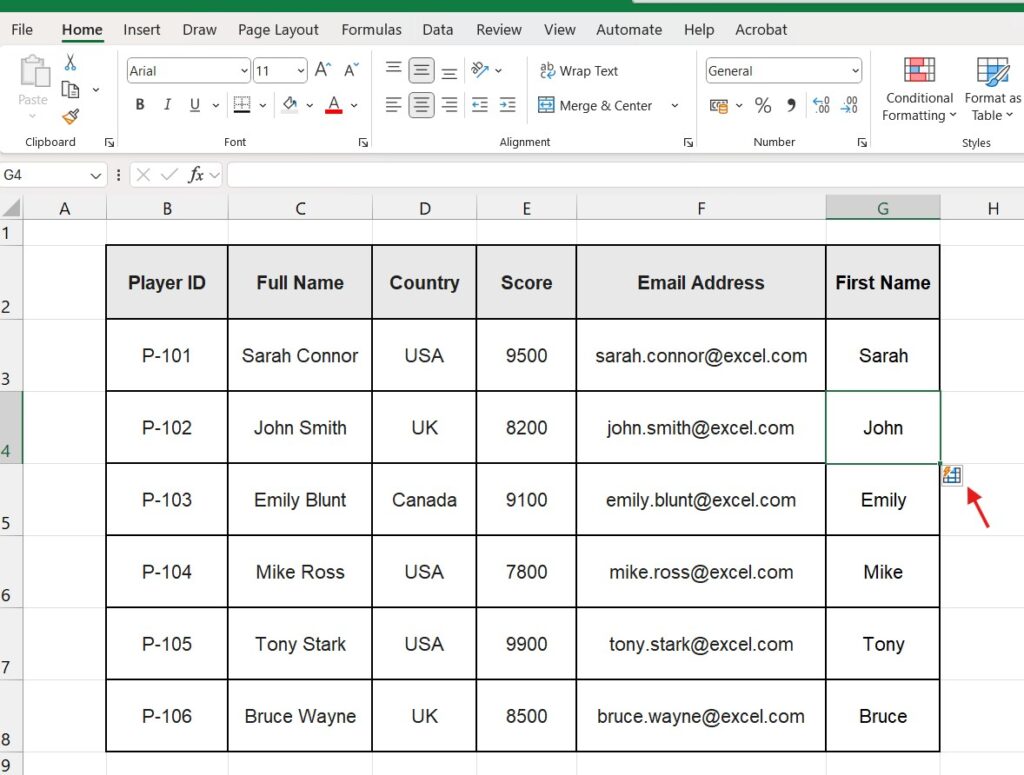
To fix this instantly, pros use Flash Fill (Ctrl + E) or Text to Columns.
- If you have “John Smith” and need just “John”, you type “John” in the next cell and press Ctrl + E. Excel uses AI to fill the rest.
Conclusion: You Don’t Need to Compete to Win
You might not be fighting for the $50,000 prize pool in Las Vegas, but using these tricks will make you the “MVP” of your office.
Start by mastering the basics. Speed comes from confidence.
Start your training today The first step to speed is analyzing data effectively. Start with our ultimate guide on How to Do Subscript and Superscript in Excel